Showing posts with label MAC Software. Show all posts

Apple Service Diagnostics 3S156 and Earlier (30.06.2013)


Apple Service Diagnostics 3S156 and Earlier (30.06.2013) | 38.1 GB

Apple Service Diagnostic tests the hardware for correct operation.


  • Apple Service Diagnostic (EFI) performs low-level tests
  • of hardware directly and does not require an operating system to run.
  • Apple Service Diagnostic OS tests use an OS X operating system to perform tests.
  • Building the bootable USB drive
  • Refer to Creating a ASD USB Bootable Drive.pdf document.
  • Booting and using the Apple Service Diagnostic application
  • Before using Apple Service Diagnostic disconnect any Ethernet network,
  • USB and Audio cables. Plug in the ASD USB drive.
  • With the USB drive plugged into a USB port restart the machine and hold down
  • the option key as the computer boots up into the system picker.
  • To run EFI tests select the ASD EFI drive icon and press return or select it with a mouse click.
  • To run OS tests select theASD OS drive icon and press
  • return or select it with a mouse click. For EFI tests the application will boot in 20-30 seconds.
  • For OS tests the application will boot in 2-3 minutes.

After running EFI or OS diagnostics press the Restart button to restart the Mac
and hold down the option key to get back to the system picker
or do nothing to get back to the normal boot drive.

Not trebuetsyaDobavleno update -
ASD archives 11-Jun-2013
ASD 3S156 supports the following machines only;
MacBook Air (11-inch, Mid 2013)
MacBook Air (13-inch, Mid 2013) Description:
Apple Service-diagnostic tests
hardware for proper operation.
Apple Service Diagnostic (EFI) performs low-level tests
hardware does not require
the operating system
All the information is in the images into PDF files.
And it is strongly recommended to read,
before running the tests.
The folder contains
52 dmg.
From 2005 to 2013.
System requirements:
List of equipment
Apple Service Diagnostics
Version: - 3S156
Mac Platform: Intel
ASD archives 11-Jun-2013
ASD 3S156 supports the following machines only;
MacBook Air (11-inch, Mid 2013)
MacBook Air (13-inch, Mid 2013)
Original disk images from Apple;
ASD_3S156.001.dmg
ASD_3S156.002.dmg
ASD_3S156.003.dmg
ASD_3S156.004.dmg
Apple Service Diagnostics 3S155
Year: 2013
Version: 3S155
Platform: Intel only
ASD 3S155 supports the following machines only
MacBook Pro (Retina, 15-inch, Early 2013)
MacBook Pro (Retina, 13-inch, Mid 2012)
MacBook Pro (Retina, 13-inch, Early 2013)
iMac (21.5-inch, Early 2013)
MacBook Pro (13-inch, Mid 2012)
MacBook Pro (15-inch, Mid 2012)
MacBook Pro (Retina, Mid 2012)
MacBook Air (11-inch, Mid 2012)
MacBook Air (13-inch, Mid 2012)
Original disk images from Apple.
ASD_3S155.001.dmg
ASD_3S155.002.dmg
ASD_3S155.003.dmg
ASD_3S155.004.dmg
Apple Service Diagnostics 3S152
Year: 2012
Version: 3S152
Platform: Intel only
System requirements:
ASD 3S152 supports the following machines only;
iMac (27-inch, Late 2012)
iMac (21.5-inch, Late 2012)
Mac mini (Late 2012)
Mac mini Server (Late 2012)
MacBook Pro (Retina, 13-inch, Late 2012)
Original disk images from Apple;
ASD_3S152.001.dmg
ASD_3S152.002.dmg
ASD_3S152.003.dmg
ASD_3S152.004.dmg
Apple Service Diagnostics 3S150
Year: 2012
Version: 3S150
Platform: Intel only
System requirements:
ASD 3S150 supports the following machines only;
MacBook Pro (13-inch, Mid 2012)
MacBook Pro (15-inch, Mid 2012)
MacBook Pro (Retina, Mid 2012
MacBook Air (11-inch, Mid 2012)
MacBook Air (13-inch, Mid 2012)
Original disk images from Apple;
ASD_ssps_004-0560.001.dmg
ASD_ssps_004-0560.002.dmg
ASD_ssps_004-0560.003.dmg
ASD_ssps_004-0560.004.dmg
Apple Service Diagnostics 3S149
Year: 20 Dek 2011
Version: 3S149
Platform: Intel only
System requirements:
ASD 3S149 supports the following machines only;
Mac Pro (Mid 2010) Only
Original disk images from Apple;
ASD_ssps_004-0499-A.001.dmg
ASD_ssps_004-0499-A.002.dmg
ASD_ssps_004-0499-A.003.dmg
This was added to the ASD archives 27-Oct-2011
About Apple Service Diagnostic 3S148
October, 2011
ASD 3S148 supports the following machines:
MacBook Pro (13-inch Late 2011)
MacBook Pro (15-inch Late 2011)
MacBook Pro (17-inch Late 2011)
Original Apple disk images;
ASD_ssps_004-0470-A.001.dmg
ASD_ssps_004-0470-A.002.dmg
ASD_ssps_004-0470-A.003.dmg
This diagnostics suite was added to the ASD archives 11-Aug-2011
ASD 3S147 supports the following machines only;
iMac (21.5-inch, Late 2011)
Original disk images from Apple;
ASD_ssps_004-0403-A.001.dmg
ASD_ssps_004-0403-A.002.dmg
ASD_ssps_004-0403-A.003.dmg
This diagnostics suite was added to the ASD archives 22-Jul-2011
About Apple Service Diagnostics 3S146
ASD 3S146 supports the following machines only;
MacBook Air (13-inch, Mid 2011)
MacBook Air (11-inch, Mid 2011)
Mac mini (Mid 2011)
Original disk images from Apple;
ASD_ssps_004-0388-A.001.dmg
ASD_ssps_004-0388-A.002.dmg
ASD_ssps_004-0388-A.003.dmg
This replaces the former ASD 3S145A
This diagnostics suite was added to the ASD archives 02-May-2012
ASD 3S145A supports the following machines only;
iMac (27-inch, Mid 2011)
iMac (21.5-inch, Mid 2011)
Original disk images from Apple;
ASD_ssps_004-0551-A.001.dmg
ASD_ssps_004-0551-A.002.dmg
ASD_ssps_004-0551-A.003.dmg
ASD_ssps_004-0551-A.004.dmg
This diagnostics suite was added to the ASD archives 28-Feb-2011
About Apple Service Diagnostic 3S144
February, 2011
ASD 3S144 supports the following machines:
MacBook Pro (13-inch, Early 2011)
MacBook Pro (15-inch, Early 2011)
MacBook Pro (17-inch, Early 2011)
To mount this disk image, download all 4 ASD parts,
and place in the same directory.
Open part 1 and all 4 parts will be assembled.
Apple Hardware Test 3A208
Apple Hardware Test supports MacBook Pro (13-inch, Early 2011)
In order to open a device image file in this directory,
you must use Mac OS X 10.1 or greater,
Original Apple disk images;
ASD_ssps_004-0303-A.001.dmg
ASD_ssps_004-0303-A.003.dmg
ASD_ssps_004-0303-A.002.dmg
ASD_ssps_004-0303-A.004.dmg
ASD_Hardvare_Test_022-5052-A
Apple Service Diagnostics 3S140
Year: 2010
Version: 3S140
Platform: Intel only
System requirements:
ASD 3S140 supports the following machines only;
iMac (21.5-inch, Mid 2010)
iMac (27-inch, Mid 2010)
Original disk images from Apple;
ASD_ssps_004-0229-A.001.dmg
ASD_ssps_004-0229-A.002.dmg
ASD_ssps_004-0229-A.003.dmg
Apple Service Diagnostics 3S139
Year: 2010
Version: 3S139
Platform: Intel only
System requirements:
ASD 3S139 supports the following machines only;
Mac mini (Mid 2010)
Original disk images from Apple;
ASD_ssps_004-0217.001.dmg
ASD_ssps_004-0217.002.dmg
ASD_ssps_004-0217.003.dmg
Apple Service Diagnostics 3S138
Year: 2010
Version: 3S138
Platform: Intel only
System requirements:
ASD 3S138 supports the following machines only;
MacBook (13-inch, Mid 2010)
MacBook Pro (13-inch, Mid 2010)
MacBook Pro (17-inch, Mid 2010)
MacBook Pro (15-inch, Mid 2010)
MacBook (13-inch, Late 2009)
iMac (21.5-inch, Late 2009)
iMac (27-inch, Quad Core, Late 2009)
Mac mini (Late 2009)
Original disk images from Apple;
ASD_ssps_693-7303-A.001.dmg
ASD_ssps_693-7303-A.002.dmg
ASD_ssps_693-7303-A.003.dmg
Apple Service Display Utility (ASDU) DVD
Year: 2010
System Requirements
iMac (27-inch, Late 2009)
Original disk images from Apple;
ASDU_ssps_063-7107-A.001.dmg
ASDU_ssps_063-7107-A.002.dmg
ASDU_ssps_063-7107-A.003.dmg
Apple Service Diagnostics 3S130
Year: 2009
Version: 3S130
Platform: Intel
System requirements:
ASD 3S130 supports the following machines.
MacBook Air (Late 2008)
MacBook (13-inch, Aluminum, Late 2008)
MacBook Pro (15-inch, Late 2008)
MacBook (13-inch, Early 2009)
MacBook Pro (17-inch, Early 2009)
iMac (20-inch, Early 2009)
iMac (24-inch, Early 2009)
Mac Mini (Early 2009)
Mac Pro (Early 2009)
Original disk images from Apple;
ASD_ 3S130_ssps_693-6912
About Apple Service Diagnostic (Dual Boot) DVD v3S116
Year: 2007
Platform: Intel
System requirements:
ASD 3S116 supports the following machines only;
MacBook (13-inch Mid 2007)
Mac Pro 8x MacBook Pro (15-inch Core 2 Duo)
MacBook Pro (17-inch Core 2 Duo)
MacBook (Late 2006)
MacBook Pro (15-inch 2.4/2.2GHz)
MacBook Pro (17-inch 2.4GHz)
iMac (24-inch Mid 2007)
iMac (20-inch Mid 2007)
Mac mini (Mid 2007)
Original disk images
ASD_ssps_693-6528-A.dmg
This diagnostics suite was added to the ASD archives 17-Aug-2005
About Apple Service Diagnostic v 2.5.8 Dual Boot CD
ASD 2.5.8 supports the following machines only;
PowerBook G4 (17-inch 1.5GHz)
PowerBook G4 (17-inch 1.67GHz)
PowerBook G4 (15-inch 1.5/1.33GHz)
PowerBook G4 (15-inch 1.67/1.5GHz)
PowerBook G4 (12-inch 1.33GHz)
PowerBook G4 (12-inch 1.5GHz)
iBook G4 (Early 2004)
iBook G4 (14-inch Early 2004)
eMac (USB 2.0)
Power Mac G5
Power Mac G5 (June 2004 Series)
Power Mac G5 (Late 2004)
Power Mac G5 (Early 2005)
iMac G5
iBook G4 (12-inch Late 2004)
iBook G4 (14-inch Late 2004)
Mac mini
iMac G5 w / ALS (Ambient Light Sensor)
PPC_ASD_ssps_693-5964-A

Download Now


Microsoft Office: Mac Standard 2011 Integrated SP3 - [Volume - Untouched]


Microsoft Office: Mac Standard 2011 Integrated SP3 -  [Volume - Untouched] | 0.99 GB

Create documents from polished templates. Rely on Outlook for Mac for your e-mail needs and more. And use the Office for Mac ribbon interface that gives you the tools you need at your fingertips and a familiar Office experience across PC and Mac. What could be more efficient than that?

System Requirements
  • A Mac computer with an Intel processor
  • Mac OS X version 10.5.8 or later
  • 1 GB of RAM or more
  • 2.5 GB of available hard disk space
  • HFS+ hard disk format (also known as Mac OS Extended or HFS Plus)
  • 1280 x 800 or higher resolution monitor
  • DVD drive or connection to a local area network (if installing over a network)
  • Safari 5 or later recommended


Download Now

Mac OS X 10.9 Mavericks DP2 Build 13A497d Update


Mac OS X 10.9 Mavericks DP2 Build 13A497d Update | 1.39 GB

OS X v10.9 Developer Preview is pre-release software. Do not use this pre-release software in a commercial operating environment or with important data.


You should back up all of your data before installing this software and regularly back up data while using the software. You will not be able to upgrade from the OS X v10.9 Developer Preview to the final release.

The OS X v10.9 Developer Preview supports the following Macs:
  • iMac (Mid-2007 or later)
  • MacBook (13-inch Aluminum, Late 2008), (13-inch, Early 2009 or later)
  • MacBook Pro (13-inch, Mid-2009 or later), (15-inch, Mid/Late 2007 or later), (17-inch, Late 2007 or later)
  • MacBook Air (Late 2008 or later)
  • Mac Mini (Early 2009 or later)
  • Mac Pro (Early 2008 or later)
  • Xserve (Early 2009)

Download Now

Native Instruments Traktor Pro 2 v2.6.2 MAC OSX-UNION


Native Instruments Traktor Pro 2 v2.6.2 MAC OSX-UNION | 302 MB

We don't want sites, neither couriers and we don't take in new crackers. If we feel you are worthy you will be contacted


Greetings goes to: CLS.CORE.DSI.HBD.LND.OGN.PDM.RZR.REBELS.X-FORCE.UCL.UCF

UNION!      


Audiofile Engineering Fidelia 1.3.1 MacOSX


Audiofile Engineering Fidelia 1.3.1 | MacOSX | 12.7 MB

Audiofile Engineering Fidelia is an elegant and powerful music player created exclusively for Mac OS X. Designed in Cocoa from the ground up, Fidelia proudly takes advantage of CoreAudio, Quartz, and other solid OS X features. Fidelia lets discerning OS X users truly optimize their home listening experience, preserving maximum sonic fidelity across multiple file formats and delivering uncluttered utility with a timelessly elegant user interface. Powered by Audiofile Engineering's unique Fidelia Audio System, it gives you the tools and the freedom to savor the sounds that you love, all the way from your hard drive to your eardrum.


It's Not a Store, It's a Library 
You know what you like to listen to. You're not looking for computer-generated recommendations, randomized shuffles, proprietary ads or social networks to validate your taste. Fidelia keeps it simple: Organize and enjoy your music library at superior levels of sonic quality.

Elegant Design 
Fidelia's distinctive user interface offers the kind of sleek, intuitive controls that contemporary Mac users demand while paying tribute to the premium stereo amplifiers of decades past. A classically styled volume dial is buffered by single-click Mute and Dim functions. 

Individual track details, stereo levels and audio waveforms are displayed in crisp, eye-pleasing fashion with no superfluous trimmings. 
Four discreet sizing options allow you to lovingly ogle Fidelia in a full-screen format or tuck it snugly into the corner of your desktop and leave the fun to your ears.

Feature ListElegant design
Sleek Intuitive controls that contemporary Mac users demand
Classically styled volume dial buffered by single-click Mute and Dim functions
Individual track details, stereo levels and audio waveforms displayed in crisp, eye pleasing fashion with no superfluous trimmings

Powered by iZotope
iZotopes industry-best sample rate conversion to achieve optimum sonic fidelity.
Discerning listeners can select real-time audio dithering via iZotopes MBIT technology.

Maxium formats
Supports AIFF, WAV, CAF, MP3, AAC, Apple Lossless, Ogg Vorbis, or FLAC formats
Supports sample rates up to 192kHz and bit depths up to 32 bit floating point

Effects
Audio Units and VST support
Customize with up to three effects

Library
Access your iTunes library
Reformat and reorganize files from iTunes library
Fidelia library


Transmit 4.4.1 MacOSX


Transmit 4.4.1 MacOSX | 27 MB

Transmit is an excellent FTP (file transfer protocol), SFTP, S3 (Amazon.com file hosting) and iDisk/WebDAV client that allows you to upload, download, and delete files over the internet. With the most Mac-like interface available, Transmit makes FTP as simple, fun, and easy as it can possibly be.

What's New In Version 4.4.1
-Fixed a potential crash when using Transmit Disk on a non-admin account
-Fixed Growl support on 10.6
-Fixed an issue where NFS shares would not appear properly in the browser
-Improved DockSend reliability when dragging multiple folders and files
-Improved Retina compatibility

Requirement:
Mac Platform: Intel
OS version: 10.5+

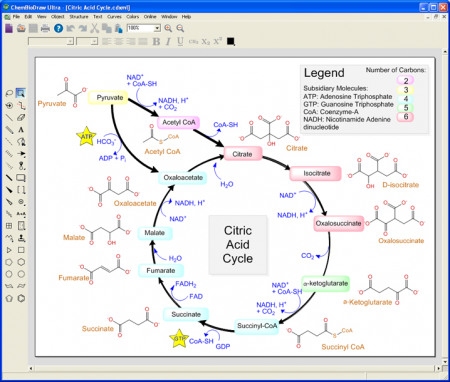
PerkinElmer ChemBioDraw Ultra 13.0.2 MacOSX


PerkinElmer ChemBioDraw Ultra 13.0.2 | MacOSX | 63.9 Mb

ChemBioDraw is the drawing tool of choice for chemists and biologists to create publication-ready, scientifically intelligent drawings for use in ELNs, databases and publications and for querying chemical databases.


ChemBioDraw is the worlds leading scientific drawing program. Hundreds of thousands of users benefit from its ease of use, high quality output, robust chemical intelligence, rich set of biological tools and integration in the ChemOffice suite and with many third party products.

ChemBioDraw includes optional versions of STATISTICA Base for more detailed numerical analysis and MNova Lite for quick processing of NMR spectra right from the chemists desktop. It also includes a chemical scripting language ChemScript for automating structure-related processes and linking to other applications.

ChemBioDraw provides chemists and biologists with a rich set of easy to use tools for creating publication ready, scientifically meaningful drawings of molecules, reactions and biological entities and pathways and for generating associated properties, systematic names and spectra.

  • Scientists can quickly, effectively and accurately communicate research and ideas using an extensive set of biological templates and drawing objects to create compelling illustrations of cells and pathways, including live chemical objects as needed
  • A single drawing solution that both chemists and biologists can trust to accurately handle and represent organic, organometallic and polymeric and biopolymer materials (including amino acids, peptides and DNA and RNA sequences) and to deal with advanced forms of stereochemistry.
  • Scientists save time and increase data accuracy by using ChemBioDraw to predict properties, generate spectra, construct correct IUPAC names, and calculate reaction stoichiometry. 
  • Find compounds (structures) of interest more quickly and accurately no matter the type of chemistry/type of structure. Better results from searches and less time spent searching creates more time for science.


Pixel Film Studios - PROGRUDGE MacOSX


Pixel Film Studios - PROGRUDGE MacOSX | 68 MB

Professional Grunge Parallax Effects. Zoom your audience into a world of suspended dirt and grunge particles to create a tense and gritty viewing experience. Whether you are creating a fight promo or an edgy dance battle, PROGRUDGE can help you create a fun and fierce style in Final Cut Pro X. From dust and scratches to full on grunge, PROGRUDGE can create many different gritty looks.


Zoom your way into a grungy, gritty world of suspended particles and dirt with PROGRUDGE from Pixel Film Studios. Simply lay one of the adjustment layers on top of your footage and see your footage transformed into a Parallax of grudge.

From lens dirt and scratches to full on grunge, PROGRUDGE offers 5 unique grudge styles to choose from. Use the customization controls to change the color, tint, focal point, saturation, and vignette to further change your grudge. The possibilities are endless.

REQUIREMENTS
Final Cut Pro X 10.0.7 or later

My Alarm Clock 1.5.3 MacOSX


My Alarm Clock 1.5.3 MacOSX | 97 MB

My Alarm Clock turns your Mac into an ALARM CLOCK that sings your favorite tunes, a BEDSIDE CLOCK with gorgeous themes and current weather information, and a SLEEP TIMER that lulls you to sleep at night!


FEATURES:
My Alarm Clock provides the functionality of 4 indispensable apps in 1:

*** Alarm ***
- Wake up to your favorite iTunes music
- Use built-in alarm sounds
- Set multiple alarms with different tunes
- Add your notes to the alarm!
- Adjust the volume of Sounds/Music
- Snooze option

*** Clock ***
- Exclusive designer clocks
- 12 or 24 time format
- Show/Hide seconds
- Show/Hide day of the week
- Enable/Disable chimes

*** Sleep Timer ***
- Create your own playlist with your favorite songs
- Go to sleep to white noise
- Adjust the volume of Music/White noise

*** Weather ***
- Check live weather conditions and temperature
- Weather conditions and temperature in any location you choose
- Temperature unit: Fahrenheit/Celsius
- Wind speed in mph, km/h, or m/s
- Show Weather 

Enjoy a perfect balance of beauty and functionality with My Alarm Clock!

What's New in Version 1.5.3
  • Screen brightness control in the Nightstand mode. Adjust it with your mouse scroll wheel, TouchPad or keybord up and down arrows
  • Multiple monitor support. Now you can get a fully functional Alarm Clock on multiple displays
  • Performance and stability improvements


Requirements
OS X 10.6 or later, 64-bit processor


Graphic Styles 1.2 Retail MacOSX


Graphic Styles 1.2 Retail | MacOSX | 369.8 Mb

The Graphic Styles set contains a generous selection of high-quality designs to help you create unique Keynote presentations. It is an excellent collection foradding some exclusivity to your slides with original bullets, characters, patterns, and image frames.


Graphic Styles contains:
- 7 bullet categories (147 bullet styles in total)
- 15 character styles
- 59 frame styles (72 frames in total)
- 27 pattern styles (243 patterns in total)

All images include transparent backgrounds that allow placing them on various colors and patterned backgrounds. You can apply the elements to your presentation by simply copying and pasting them or, if you are applying a pattern, copying and pasting the selected graphic style.

You can also adjust the tint, brightness, and other parametes of the frames and characters, as well as change the fill and opacity of the patterns.

Graphic Styles is designed to be used with Apples Keynote but you can also paste the images to Pages, Numbers, or iBooks Author.

*** Requires Keynote 5.0 or later

Requirements: OS X 10.6.6 or later

Magic Window Timelapse Desktop 1.5 MacOSX


Magic Window Timelapse Desktop 1.5 | MacOSX | 671.6 MB

Magic Window is the absolute best and most beautiful live wallpaper and screen saver available for your Mac. It includes complete timelapse views of coasts, beaches, cities, mountains, lakes, and more. Watch as time and light slowly paint the skies beautiful colors and the cities transform from day to night and back again.

Created by the same team that brought you Magic Window for iPad and iPhone, Timelapse Desktop is a new style of desktop wallpaper made using timelapse photography. The wallpapers slowly blend over time revealing magical changes in scenery and color.

Magic Window includes 93 scenes: 7 are built into the app, and 86 are downloaded after you install the app. We use scene downloads so we can bring you more and more scenes without making the app larger and larger. There are no additional charges for scenes. You can install the app on as many Macs as you want and download scenes as many times as you want.

Magic Window scenes are full 16: 10 HD resolution (1920x1200) and look fantastic on every single Mac as well as HD displays. These are truly high definition wallpapers, not stretched low resolution videos.

Magic Window fully supports multiple monitors, allowing you to have different scenes on each display and to selectively enable or disable displays. AirPlay can also be used in Mountain Lion to display the scenes on an Apple TV.

Magic Window offers a variety of speeds that let you control how much CPU it consumes. On the slowest speed Magic Window can consume less than 2% CPU, leaving your Mac free to focus on other tasks.

What's New in Version 1.5 
New scenes from Paris, Amsterdam, Scotland, Iceland, New York City, and more! 17 new scenes (93 total!) 
Fully refreshed user interface
Many scenes remastered (including Mt. Shasta)


Requirements: OS X 10.6.6 or later


Download Now

ColorStrokes 2.3 (MacOSX)


ColorStrokes 2.3 (MacOSX) | 16.9 MB

ColorStrokes is the unique app that lets you manipulate colors on photos in any possible way. 


ReColor your images 
You have all the colors and tones under the hand, so pick whatever you like, mix colors and make photos look excitingly different. Its a unique way to bring new life to the old snaps, made in black&white times.

Create stunning color splash images 
Convert color photos to monochrome and reveal the color of specific areas. Select different monochrome layers: (grayscale, vintage, bluetone) or add more drama with special effects.

ColorStrokes also features
  • Editing tools to enhance your images even further (gamma, contrast, blur, hue, exposure, etc)
  • Customized brushes for more precise coloring
  • Import images from iPhoto and Aperture
  • Export to iPhoto, Aperture or Photoshop
  • Share via Facebook, Flickr, Twitter, etc
  • Print images
  • Order canvas prints right from the app

ColorStrokes is an impressive photo editor and works like a charm with Mountain Lion.

There is even more awesomeness and great tools in ColorStrokes, but you need to check it to find out.

Whats New in Version 2.3

Version 2.3 brings incredible performance improvements and iCloud support.

ColorStrokes is now running on the new algorithm that makes the app at least 2X faster (depends on your Mac parameters). Color processing algorithm has been updated: the color brush works much better and it is even more easier to recolor edges of the objects.

New algorithm for vignette and recoloring.

We've also improved sharing to social media and added Tumblr sharing.
Minor bugs with performance on OS X 10.8 are fixed as well.


NewBlueFx Film Effects 3.0 Plugin for Adobe After Effects MacOSX


NewBlueFx Film Effects 3.0 Plugin for Adobe After Effects (MacOSX) | 23 MB

NewBlue Film Effects transports your digital video back to an authentic, old school film look with blemishes, jitters, spots, scratches and graininess. This collection of 81 presets in 5 filters uses powerful technology to recreate the visual effects of hand-cranked cameras, dirty projectors and the unique color and lighting characteristics of film. 


SET INCLUDES

Film Camera, Film Damage, Film Express, Film Color, Film Pro. Version 3.0 Build Win: 130415, Mac: 130415

Recommended System Requirements

  • Mac OS X v 10.6.8, v10.7.2 or later
  • 1 GHz processor (multicore or multiprocessor CPU recommended for HD)
  • OpenGL 2.1-capable graphics card and minimum 256MB graphics memory.
  • 512MB or higher recommended for HD.
  • 200 MB hard-disk space for installation
  • 1 GB RAM (2 GB RAM recommended for HD)


Radeon HD 2400, GeForce 8600, GeForce 120 or Quadro FX 4500 or better. Intel HD Graphics not supported.

Video Editing Host Compatibility

  • Adobe After Effects 7.0 +
  • Adobe Premiere Elements3.0
  • Adobe Premiere Pro CS3/4, CS5/5.5, CS6/6.5
  • Apple Final Cut Express 4+
  • Apple Final Cut Pro 5.1+
  • Apple Final Cut Pro X
  • Avid Media Composer and Symphony 5, 6/6.5
  • Avid Studio
  • Corel Video Studio X2+
  • Cyberlink 11+
  • Grass Valley Edius 4, 5/5.5, 6/6.5
  • MAGIX Movie Edit Pro/Plus /Premium17
  • MAGIX Video Pro X3
  • Pinnacle Studio 10 +
  • Sony Vegas Pro 8, 9, 10, 11, 12 (32-bit/64-bit OpenFX/DirectX)
  • Sony Vegas Movie Studio 8, 9, 10, 11, 12 (32-bit/64-bit OpenFX/DirectX)


Works in CPU mode.