Showing posts with label Office Software. Show all posts

Hot Keyboard Pro 4.5.45


Hot Keyboard Pro 4.5.45 | 2.7 Mb

Hot Keyboard is a personal productivity tool for Windows operating system. Whether you are working, or just having fun, Hot Keyboard helps you make computer tasks faster. Create macros, assign them to hotkeys and forget repetitive tasks!Features:
Reduce the risk of injury from repetitive loading of muscle (RSI, Repetitive Strain Injury), caused by frequent keystrokes and mouse movements of hands from mouse to keyboard and back;

trigger actions in a specified time;
print a list of keyboard shortcuts;
combined action of the group and show it in a menu by pressing a hot key (not to appoint an individual for every action combination);
assign hotkeys programs, documents and Web pages directly from Windows Explorer;
perform a sequence of different actions (run, push a few buttons, close the program);
use a keyboard with extra keys.
Hot Keyboard Server allows all computers have the same set of hot keys and actions, as well as synchronize them between computers in the event of changes;
Hot Keyboard can run invisible to the user;
ability to quickly install without issues and dialogues.

By pressing the key combination, you can:
insert text, avoiding a set of one and the same text again and again (phone numbers, favorite links, addresses, greetings, signatures);
run programs and open documents, avoiding wasting time searching for the necessary applications in folders on your computer or the Windows menu and not clutter your desktop with unnecessary labels;
control the sound volume of your computer from any application (you call someone? mute the music at the touch of a button!)
open your favorite web-pages at once without having to enter an address or select from the "Favorites";
control the playback of a CD or WinAmp \ th, continuing to work in another program or playing full-screen games;
record a sequence of keystrokes and mouse actions and then play with the possibility of duplication or acceleration (it should do the same thing 100 times? – leave it to Hot Keyboard);
perform various operations with windows (minimize, maximize, move, etc.);
to easily launch screen saver / screen saver \ a (just in case someone did);
connect to the Internet or, conversely, shut down – quicker and easier than climbing in the "Start" or "Desktop";
restart the computer (and enter a state of "Stand by", "Hybernate", "Logoff")
create a "reminder" that works after a set time and day (for those who have not burned a single pan, placing a warmed dinner and sat at the computer for two minutes …).

Home Page – hot-keyboard.com

Visible Body Human Anatomy Atlas v3.0.1-DVT | 203 Mb


Visible Body Human Anatomy Atlas v3.0.1-DVT | 203 Mb

Human Anatomy Atlas is our best-selling and award-winning human anatomy general reference. The application is a revolutionary 3D visualization and learning tool used to explore the systems of the human body. It contains more than 3,600 anatomical structures, including all major organs and systems of the male and female body. This application is used by healthcare professionals, patients students, and all others interested in detailed visualization of human anatomy.


Visible Body Human Anatomy Atlas v3.0.1
This isnt something to share with your school mates and not for sale Go and ask mommy to buy this app if you like it!

Install Notes
1. Unpack & Install

Rosetta Stone Version 3 Spanish Latin American - Levels 1 2 & 3 (2007)


Rosetta Stone Version 3 Spanish Latin American - Levels 1 2 & 3 (2007) | 1.32 GB


Version 3 significantly improves our product with exciting new benefits which include:

NEW Proprietary speech recognition technology gets you speaking from the start and NEW speech analysis tools perfect your pronunciation.


NEW Milestone feature lets you try out your new language knowledge in real-life simulations.

IMPROVED Intuitive, sequential learning makes every lesson count and build progressively.

A Complete Foreign Language Curriculum in Spanish (Latin America)


Rosetta Stone® is a proven, effective and comprehensive solution for your language-learning needs. New speech recognition technology, intuitive sequential learning, and real-life simulations provide just the right context to help you start speaking, reading, writing and understanding Spanish (Latin America) in no time flat! 


Connect with the world around you. Build a foundation of fundamental vocabulary and essential language structure. Quickly gain the confidence to enjoy social interactions such as greetings and introductions, travel, dining out, giving and getting directions, shopping and other recreational activities. Learn to share your ideas and opinions, express your feelings and talk about everyday life, your work, your interests, current events, and much more.

DOWNLOAD NOW

Learn to Speak English Deluxe 10


Genre: e-Learning / Language / English

Trying to learn English? Learn to Speak? English 10 software is an all-inclusive language program that uses a wealth of instructional techniques to help you learn English. It includes lessons in vocabulary, grammar, and conversation (both verbal and written), and provides plenty of practice, drill and review in each of these areas. Unlike most language software programs, Learn to Speak? English teaches the language from the ground up. It not only immerses the user in the language, but it provides extensive grammar lessons as well. The course is equivalent to a 2-year college course in English!


Each Lesson contains a vocabulary list, story, dialogue, grammar topic, conversation lab, and exercises. Also included are fun games to break the monotony while strengthening and reinforcing learning. Speech recognition technology allows users to test their knowledge and perfect their accents with immediate feedback from the computer.

Learn to Speak English 10 includes the following features:

* 40 Lessons
* Speech Recognition
* Games & Crossword Puzzles
* Audio Course
* iPOD and MP3 Lessons
* Printed Reference Book
* Personalized Lesson Plans
* Diagnostic Pre test
* Practice Workshops
* Advanced Online Courses
* Online Cultural Resources
* PDA Dictionary
* Printable exercises
* 1 convenient DVD-ROM
* Bonus MP3 Audio Tour

Included Content:

- 1 DVD-ROM for the computer
- 3 Audio CDs
- 115 page workbook for practicing away from the computer.

DOWNLOAD NOW

Mus2 2.0.4


Mus2 2.0.4 | 102 Mb

Notation software for microtonal works and Turkish maqam music.Mus2 (pronounced /mu?siki/) is a music application designed for the notation of microtonal works and Turkish maqam music. Tasks that require cumbersome workarounds in other notation software are extremely easy to accomplish in Mus2.


Home Page - www.mus2.com.tr

ACDSee 16.1.88


ACDSee 16.1.88 | 75.1 MB

Lightning-fast and easy to use, ACDSee Photo Manager has everything you need to organize your photos, perfect your shots, and share your memories with friends and family. With ACDSee Photo Manager you can quickly and easily browse and find photos, and fix red-eye, lighting and more with easy-to-use editing tools.


Browse fast:
  • Browse your existing collection instantly. There's no need to waste time importing your photos into a separate library. Access your folders and files live, in real time. Sort, group and filter photos by camera information, edited state or other criteria for super fast scanning. You can also browse by date or event to see photos from a specific occasion.


Organize flexibly:
  • Create custom categories, add descriptive keywords, edit EXIF and IPTC metadata, and assign ratings to your photos. Tag images with one click and bring them all together for further editing or sharing. You can even organize your photos as you import them from your camera or storage device, saving you even more time.

Find in a flash:
  • Find any photo, even if you have thousands in your collection. Enter multi-word keyword phrases like ski trip or birthday party, search only specific folders, leverage your camera's file information, and find that one special image with the Quick Search bar. Build detailed searches and save them for ongoing use.

Manage everything:
  • Bring together over 100 file types into one convenient place. View, manage and get extensive format support for your photos, audio and video clips including BMP, GIF, JPG, PNG, PSD, MP3, MPEG, TIFF, WAV and many others. View your files even quicker by setting ACDSee as the default program to open these types of files. Take a look at the complete list of supported file formats.

Protect your photos:
  • Keep copies of your photos in case your computer should fail. Synchronize your folders with an external hard drive or networked drive. Or backup your photos and database information to CD or DVD. You can even schedule automatic backups and reminders.


NI LabView 2013 v13.0 32Bit/64Bit + ToolKits Full


NI LabView 2013 v13.0 32Bit/64Bit + ToolKits | 5.49 GB

National Instruments released NI LabVIEW 2013, the newest version of its system design software for engineers and scientists. With LabVIEW 2013, NI integrated the latest and most innovative technologies into the software while reducing design complexity from basic measurements to full test platforms.


New LabVIEW 2013 benefits include:
  • Native support for the newest hardware from vendors like ARM and Xilinx, including the Xilinx Zynq All Programmable system on a chip used in high-performance systems.
  • Enhanced application reliability and quality for complex applications through a suite of code management, documentation and review tools. New tools integrate with a software engineering process, including a new Subversion plugin from Viewpoint Systems.
  • Streamlined deployment technologies for developers who want to deliver professional applications to users, including a new tool from Wirebird Labs.
  • Delivering systems on the latest mobile platformsfor iOS and Android that enable dashboards for remote monitoring and system control.


These new capabilities are delivered through the familiar LabVIEW programming paradigm, eliminating developer need for expensive new toolchains or the acquisition of OS- or hardware-specific training or talent.

LabVIEW 2013 emphasizes the incorporation of ongoing user feedback through the inclusion of more than 100 new features and improvements in the LabVIEW editor. NI has also simplified and expanded access to resources that ensure LabVIEW programmers can take full advantage of a product's broad toolset. Customers with an active service contract will benefit from an expanded library of online training resources from the use of real-time targets to programming for FPGAs and even object-oriented programming. This training is combined with redesigned application examples and new sample projects to provide programmers a variety of resources that cater to different learning styles.

This version has also new features for all LabVIEW modules as well as updates and bug fixes to the rest of the LabVIEW platform.

DOWNLOAD NOW

Tipard PDF ePub Converter 3.1.6 Multilingual


Tipard PDF ePub Converter 3.1.6 Multilingual | 340 MB

Tipard PDF ePub Converter, the professional and accurate PDF to ePub Converter, can help you conveniently convert PDF to ePub format. While ePub format is a standard eBook format, which is widely supported by portable devices, such as Apple iPad, iPhone and iPod touch, Sony Reader, Hanlin eReader, etc. This PDF ePub Converter can provides you with the best PDF to ePub converting experience. It will preserve the original texts, layout, images, hyperlinks and everything while converting PDF to ePub format.


- Convert PDF to ePub format
- Define the specific pages to be converted
- Support multi-language PDFs

Home Page : _http://www.tipard.com/pdf-epub-converter/

Link Download
http://rapidgator.net/file/883ffd1aca262593c7fe84a600cfc200/Tipard_PDF_ePub_Converter_3.1.6.rar.html

Microsoft Office: Mac Standard 2011 Integrated SP3 - [Volume - Untouched]


Microsoft Office: Mac Standard 2011 Integrated SP3 -  [Volume - Untouched] | 0.99 GB

Create documents from polished templates. Rely on Outlook for Mac for your e-mail needs and more. And use the Office for Mac ribbon interface that gives you the tools you need at your fingertips and a familiar Office experience across PC and Mac. What could be more efficient than that?

System Requirements
  • A Mac computer with an Intel processor
  • Mac OS X version 10.5.8 or later
  • 1 GB of RAM or more
  • 2.5 GB of available hard disk space
  • HFS+ hard disk format (also known as Mac OS Extended or HFS Plus)
  • 1280 x 800 or higher resolution monitor
  • DVD drive or connection to a local area network (if installing over a network)
  • Safari 5 or later recommended


Download Now

PerkinElmer ChemBioDraw Ultra 13.0.2 MacOSX


PerkinElmer ChemBioDraw Ultra 13.0.2 | MacOSX | 63.9 Mb

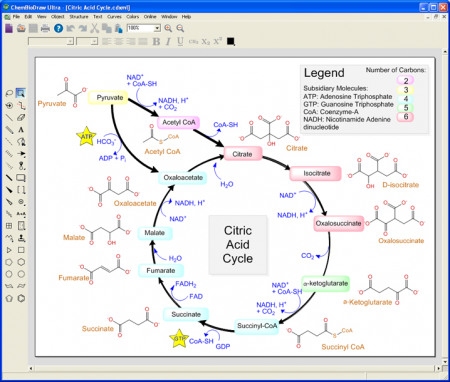
ChemBioDraw is the drawing tool of choice for chemists and biologists to create publication-ready, scientifically intelligent drawings for use in ELNs, databases and publications and for querying chemical databases.


ChemBioDraw is the worlds leading scientific drawing program. Hundreds of thousands of users benefit from its ease of use, high quality output, robust chemical intelligence, rich set of biological tools and integration in the ChemOffice suite and with many third party products.

ChemBioDraw includes optional versions of STATISTICA Base for more detailed numerical analysis and MNova Lite for quick processing of NMR spectra right from the chemists desktop. It also includes a chemical scripting language ChemScript for automating structure-related processes and linking to other applications.

ChemBioDraw provides chemists and biologists with a rich set of easy to use tools for creating publication ready, scientifically meaningful drawings of molecules, reactions and biological entities and pathways and for generating associated properties, systematic names and spectra.

  • Scientists can quickly, effectively and accurately communicate research and ideas using an extensive set of biological templates and drawing objects to create compelling illustrations of cells and pathways, including live chemical objects as needed
  • A single drawing solution that both chemists and biologists can trust to accurately handle and represent organic, organometallic and polymeric and biopolymer materials (including amino acids, peptides and DNA and RNA sequences) and to deal with advanced forms of stereochemistry.
  • Scientists save time and increase data accuracy by using ChemBioDraw to predict properties, generate spectra, construct correct IUPAC names, and calculate reaction stoichiometry. 
  • Find compounds (structures) of interest more quickly and accurately no matter the type of chemistry/type of structure. Better results from searches and less time spent searching creates more time for science.


Graphics Converter Pro 2013 3.30 Build 130715


Graphics Converter Pro 2013 3.30 Build 130715 | 32.7 Mb

Graphics Converter Pro is an easy-to-use and powerful batch graphics converter and image viewer, that can import more than 500 graphic formats and export more than 100 formats including BMP, GIF, JPG, PNG and many others. The program comes with 50 image filters and 12 image effects and more. Graphics Converter also supports EXE Builder. It will quickly convert a group of pictures and PDF to a stand-alone exe file, so let you easily create self-running slide show package (exe file), and make PDF readable on any computer without Adobe PDF software installed. You can customize properties, such as set password and picture quality, background music and page title etc. Graphics Converter Pro offers 12 image effects, including Flip, Wave, Noise, Arbitrary Rotation, and more. You can save your selected filters or effects as default set, and apply them in a batch processing. Support file association, slide show, live update and desktop capture.


Basic Inventory Control 5.0.135


Basic Inventory Control 5.0.135 | 11.4 MB

It tracks the orders, receipts, shrinkage, allocation, and shipment of products. BIC displays physical units in stock, allocated units, available units in stock, and units on order. It produces reports such as Current Inventory, Out of Stock Products, and Inventory Transactions for the criteria you specify.


Flowerfire Sawmill Enterprise 8.6.3.1 Multilingual (x86/x64)


Flowerfire Sawmill Enterprise 8.6.3.1 Multilingual (x86/x64) | 28/31 MB

Sawmill ENTERPRISE brings together all the power of Sawmill PROFESSIONAL and adds support for multi-processor systems. ENTERPRISE edition also offers full support for the industry-standard MySQL database (including MySQL Cluster) as well as the integrated Sawmill database as used in LITE and PROFESSIONAL. The Sawmill scripting language (Salang) also offers the ENTERPRISE user the ability to customize the complete user interface (Administration and Report interfaces) and add or modify many of the reporting functions in order to customize or personalize the product or to add specialized functions.


Sawmill Enterprise features include:
Report drill down (Zoom Filters)
Clickstream Web Visitor Reports
Integrated Sawmill Database

Complete* GUI control via Salang
User Management Editor for admin and report user access
Log Filter Editor (Import Filters) to filter the raw log data into the database
Report Filter Editor (Output Filters) to filter the report being displayed without changing the database
Report Editor for modifying the reports and the report menu allowing creation and editing of the reports - the graphs, tables and report menu navigation
Sawmill Scheduler for automation of all report functions
DNS resolution for log data IP addresses
Geographic Location reports to the City level via GeoLite City
635 supported log file formats
Multiple log sources including Cluster / Load Balanced environments via HTTP, FTP, Local File or Command Line
Single, 5, 10, 25, 50, 100, 500, 1000, 5000, 10000 and unlimited profile license packs

Languages: English, German, Italian, Czech, Chinese (Traditional) and Polish.
OS : Windows NT / 2K / XP / 2003 / Vista / XP X64 / Vista64 / 7 / 7 x64
Home Page - http://www.sawmill.net/ent.html

DOWNLOAD NOW
Or

AVS Document Converter 2.2.7.222


AVS Document Converter 2.2.7.222 | 32 MB

AVS Document Converter is designed to view and convert various types of documents. It reads text and image files and converts them to PDF, DOC, DOCX, RTF, TXT, ODT, HTML, JPEG, TIFF, EPUB and other formats.


The user-friendly interface of the program helps you perform the following operations:
  • convert several files at once using the Batch Conversion option;
  • switch to Thumbnails view to find the appropriate page;
  • automatically scroll your document while you read it;
  • create an archive of your documents;
  • email files from within the program;
  • add watermark and password to protect your PDF files;
  • rename your documents;
  • extract images and save them as separate files.


All key formats are supported
Read: PDF, HTML, HTM, MHT, RTF, DOC, DOCX, ODT, PPT, PPTX, TXT, TIFF, TIF, EPUB, FB2, DjVu, XPS
Write: PDF, HTML, MHT, RTF, DOC, DOCX, ODT, TXT, GIF, JPEG, PNG, TIFF, EPUB


Premier System X4.2.898 DC 10072013 Multilanguage


Premier System X4.2.898 DC 10072013 Multilanguage | 291 MB

An advanced and complete economic software (original Windows application) whose unique graphic design and ergonomic environment offer a wide number of options to suit the program to individual needs and requirements of the client.


Advantages and Distinctions of the Software

Complexity
The wide assortment of modules allows covering all areas of the company management in any industry (see Reference)

Large font
The unusually large letter font provides the user with a well-visible and ergonomical graphic environment easy for orientation.

Interaction
The navigation through the program is based on interactive nesting so the user does not get confused by a large number of functional keys and icons on the screen at once.

Modularity
The user can choose modules or packages that meet own needs and specific requirements. Below is the list of separate program modules that are further comprised of submodules, e.g. Customers (Billing, Due Notices, Penalization, Deposit Bills, Partners Directory, Invoice Patterns, Receivable Overview, etc.).

Flexibility
The way the program has been designed allows the user to perform almost any modification required to meet the user's needs in a relatively short time. This applies as well for the area of legislative continuity.

Interface: english, german, czech, slovak


Satellite Antenna Alignment 2.97.0.0 Multilingual


Satellite Antenna Alignment 2.97.0.0 Multilingual | 2.4 MB

The program "Satellite Antenna Alignment" is used to calculate the angles necessary for installing satellite dishes. The main difference from similar software is the possibility to calculate the position for all satellites at once. Thus, you get a clear picture about what satellites can be physically visible from the location where the dish will be installed. It should be kept in mind that the program makes a purely theoretical calculation according to formulas and in real circumstances a lot of additional factors should be taken into account when a satellite dish is installed. These factors include various obstacles (buildings, trees), the landscape, the altitude, transponder orientation, polarization, etc. Nevertheless, this program will allow you to evaluate the position quite precisely. The calculation can be saved to a text file, copied to the Windows clipboard or printed out at once. It is possible to save the list of locations for which the calculation is done. Later on, you will not have to enter the coordinates of these locations again. Just select them from the table.


The high latitude is specified with the "N" char, the low latitude is specified with the the "S" char. Similarly, the eastern longitude is with the "E" char, while the western longitude is with the "W" char. After all the coordinates are entered, you will see the calculation for all satellites at once in the table to the left. Their azimuth and elevation are calculated. Azimuth is the direction to the satellite in degrees from the clockwise direction to the north. Elevation is an angle (measured in degrees) between the direction of the signal from the satellite and a tangential plane to the Earth surface in the location. If the elevation is negative, the satellite is below the horizon and it is impossible to receive signals from it in principle. Thus, the satellites whose elevation is a positive value are theoretically visible from your location. If you know the azimuth, you can quickly find the direction to the satellite and see what obstacles (neighboring houses, trees) there are in the way of the signal from the satellite to your dish.

As it was mentioned above, the program uses absolute values and calculates everything according to formulas. Thus, the calculated azimuth is an angle from the true north and not from what your compass may show because a compass is a really unstable thing, especially in a city. It is better to orient it by the sun )

Additionally, the program has a mechanism for calculating the azimuth of the sun and you can do everything without a compass now! The azimuth is calculated for the location the coordinates of which you specified for calculating the azimuths of satellites. You can specify the date (the current date is taken by default) and calculate how the sun moves with a one minute discontinuity. The calculation results are displayed in the table to the left. Both the azimuth and the elevation are calculated for the sun for the current moment of time. Thus, you can install the satellite dish without a compass at all. First, find the azimuth of the satellite you need. Then calculate the azimuth of the sun for the day on which you are going to install the dish. Find the azimuth of the sun that is most close to the azimuth to the satellite and you will see the time (and date) when the sun will be in the same direction where the satellite is. Turn the dish to the sun at the specified moment of time, the azimuth of the sun coincides with the azimuth of the satellite at this moment. Or just note this direction and install the dish later. Remember to specify your time zone for calculation (Moscow: +3 GMT). The program also calculates the azimuths of the sunrise and sunset, as well as the time and elevation when the sun is exactly in the south.

The program draws a simple diagram representing the four directions. The yellow sector is daytime, its eastern part is sunrise and its western part is sunset. The same diagram can be used to schematically represent the direction to the satellite you need. Select the satellite from the drop-down list and the red line will show the direction to it (azimuth). If the elevation is negative, no red line is drawn (the satellite is not visible).

Offset satellite dishes are widely spread now. When such a dish is completely vertical, it already has some elevation (~20-25 degrees). You can enter the size of your offset dish (height and width) and the program will calculate the exact elevation for this dish. The calculation is done only for dishes whose height is greater than width. Enter the size of the dish in millimeters. Here you will see the elevation to the selected satellite and the angle you should actually install you dish at (in degrees from the Earth surface).


Softerra LDAP Administrator 2013.1 4.9.13410.0 (x86/x64)


Softerra LDAP Administrator 2013.1 4.9.13410.0 (x86/x64) | 32 MB

Softerra LDAP AdministratorTM is an easy-to-use LDAP administration tool designed to work with almost any LDAP server including Active Directory, Novell Directory Services, Netscape/iPlanet, etc. Softerra LDAP AdministratorTM significantly simplifies management of LDAP directories providing advanced directory search facilities, bulk update operations, group membership management facilities, etc. Customizable directory reports equip administrative personnel with information necessary for effective monitoring and audit. Directory data can be exported and imported in LDIF, CSV, DSML1, DSML2 and other formats. LDAP-SQL support allows managing LDAP entries using SQL-like syntax and performing LDAP operations that cannot be executed via standard LDAP means.


Why You need LDAP ADMINISTRATOR
  • Can you visually and intuitively modify your LDAP directory without using command line utilities but still having all the advantages and power of Windows GUI?
  • Can you access OpenLDAP, Netscape/iPlanet, Novell eDirectory, Oracle Internet Directory, Lotus Domino or Microsoft Active Directory with just one tool?
  • Can you quickly manage and navigate throughout your directory regardless of its huge size and hierarchical complexity?
  • Have you got a tool that uses efficient LDIF import and export to maintain your directory in a good working order and to eliminate all sorts of data corruption risks so that you could always restore information from backup?


OS : Windows XP SP2+/2003 SP2/Vista/2008/7/8/2012
Language : English


Universal Document Converter 5.8.1306.25160 Multilanguage


Universal Document Converter 5.8.1306.25160 Multilanguage

"Universal Document Converter is the best converter software I have found and tested. It is easy to install, easy to understand and to manipulate. The result of each conversion is very, very close to the original."

Universal Document Converter is the most complete solution for the conversion of documents into PDF, JPEG, TIFF or other graphical files.The underlying basis of the program is the technology of virtual printing. As a result, exporting documents into a chosen format is not any more complicated than printing on a desktop printer.


Document Sharing and Archiving
Exchanging documents in the Adobe PDF format protects you and your clients from any technical difficulties. Read more...

Presentation Creation
Documents converted to JPEG or PNG graphic formats can be easily inserted into your PowerPoint presentations without any problems. Read more...

Web Publishing
Publishing presentation materials and product catalogs in the Adobe PDF format offers clients all needed information in a reliable and change-protected form. Read more...

Preparing Layouts for the Printshop
Converting documents into the TIFF format guarantees high printing quality and simplifies work with printshops and publishers. Read more...

Corporate Workflow System Deployment
Universal Document Converter reduces your expenses on the development of a corporate workflow system.

PDFMate PDF Converter Professional 1.64 Multilanguage


PDFMate PDF Converter Professional 1.64 Multilanguage

PDFMate PDF Converter Professional is a comprehensive PDF conversion application to help convert PDF to other formats for daily usage. 
  • Convert PDF to Word/Text/EPUB/Image/HTML/SWF
  • Specify any page or page range of PDF for conversion
  • Change original PDF layout or page size with PDF2PDF function
  • Easy to use; advanced settings; multi-languages supported


Comprehensive PDF Converter
  • PDF to Word Converter: Convert all kinds of PDF files to Microsoft Office 2007 Word document for further reading and editing easily and freely. 
  • PDF to EPUB Converter: To view PDF documents with portable Ebook reader in a more comfortable way, converting PDF to EPUB ebook format is the wise choice. 
  • PDF to Image + HTML + SWF Converter: A PDF can be turned to many perfect output files. So that you can enjoy viewing PDF document in picture format or browsing it like a webpage or even watching the file like a flash video. 
  • PDF2PDF Converter: Make you own style PDF file by changing its layout (A3, A4, A5) and page size (1IN1, 2IN1, 4IN1). Keep all your PDF documents in security by adding password to open, edit, copy and print action. 
  • Specify any page to convert. Not all pages of PDF file need to be converted. It happens that you only need to convert a specified page to the format you want. The fuction of PDFMate PDF Converter Pro to specify page to convert solves this problem easily and effectively.
  • Specify page range to convert. Save a lot of time and improve the working efficiency. It offers a great convenience to the people who have to select some pages of a long PDF document for conversion. What you need to do is to input the number(s) of the exact page or page range of the PDF file and apply enter to confirm.


Advanced Settings to Output File
  • Convert all content from original PDF files. With this professional PDF Converter, you can choose to convert the whole original PDF file to other formats, e.g, extract all content from PDF to EPUB eBooks just the same with the original, convert PDF to sheets of images with all original content included when converting PDF to JPG image, and so on.
  • Extract specific content from PDF. You can also extract or ignore specific content from the original PDF files: you can extract only images of the original files when converting PDF to JPG, make new content without images, hyperlinks when converting PDF to EPUB e Books, and choose to ignore images, hyperlinks, etc. to get your own HTML from PDFs.

All Tasks Turn Easier than Ever
  • User-friendly interface. You can find any option you want to use easily with this PDFMate PDF Converter Professional program. Moreover, the whole conversion process is pretty simple too. With 1-2-3 click: Add PDF > Choose output format > Click "Convert", you can finish converting from PDF to Text documents, EPUB Ebooks, HTML files, EPUB ebooks, Microsoft Office Word 2007 documents within seconds. 
  • Built-in Help guide. Facing any problem when using the program? Just check the built-in help document. It contains fully detailed information to operate this program. 
  • Batch conversion. PDFMate PDF Converter Professional allows batch conversion. It processes at high speed and you can convert numerous PDF files to other format of files at one time. 

Perserve High Quality; Support Multi-language
  • Preserve high quality. Although PDFMate PDF Converter Professional provides fast conversion from PDF to other formats, the conversion result is also perfect. It does a job on converting multi-column files.
  • Convert all languages of PDF files. PDFMate PDF Converter Professional supports converting PDF files in all kinds of languages: English, Japanese, Traditional Chinese, Simplified Chinese, Korean, Latin, Turkish, Greek, German, French, Italian, Portuguese, Spanish, Russian, Polish, Czech, Slovak, Ukrainian, Bulgarian, Croatian, Romanian, etc. 


ABBYY PDF Transformer 3.0 Build 9.0.102.46


ABBYY PDF Transformer 3.0 Build 9.0.102.46

Here we goo. Another good update from ABBYY.. ABBYY PDF Transformer is a powerful tool that enables you to author and to convert PDF files into multiple editable formats.

The program is packed with a lot of features that anyone that works with PDF files can find useful.The most basic action that the program can perform is to create a PDF file from a text document. The program can load TXT, RTF or HTML files and transform them in a PDF file in a couple of clicks. But we have to mention that the HTML files will include the images and styes of the original page, not just the text.


You can quickly add a stamp to your document by configuring a stamp profile and selecting before creating a document. The stamp can include a custom text and variable fields such as the page number, the date or the time. This stamp is added on each page in a custom location in order to personalize the document.Another authoring function allows you to merge different types of documents into a single PDF file. The user can add multiple files, change the file order, choose the output settings and create a document with one click. The source documents can be of different types.

This application is not limited to creating PDF files but can also convert them into text files, Word documents or Excel tables. The use of this function is limitless as the Internet contains a large number of PDF file that contain information in a non editable format. If you need to use the content of these files you can try this program.You can use the program to convert a PDF file into a searchable document. Basically, if you have a PDF document that does not allow you to search for a certain text because it was saved as an image this program can enable the search function.

When creating a PDF file the program can compress the content if you want to publish it on the Internet and protect the file by restricting the access with a password. You can also restrict the use of the content by restricting the print, edit or extract options in the PDF viewer.Whether you create contracts and documentation files or simply use PDF files to publish documents of the Internet, this program is a complete tool that can help you do a better job.

Here are some key features of "ABBYY PDF Transformer":
  • Intelligent PDF Conversion Technology
  • Accurate Re-creation of Document Layout and Formatting
  • One-Click PDF Conversion from Windows Explorer
  • Conversion of PDF documents to Editable Formats
  • Manual Area Selection Tools for Advanced Users
  • Flexible Layout Retention Options
  • Conversion of Selected Areas and Pages
  • Print-to-PDF Function from Any Application
  • Retention of Links, Hyperlinks and Metadata
  • Conversion of Scanned PDFs to Searchable PDF files
  • Appending New Files to Existing PDF


Install Notes:
  • Unpack and install the program.
  • Apply the included patch, targetting the file "Awl.dll"( This file should be located in ABBYY FineReader 11 folder)
  • Run the bat file to complete registration.